---
title: GeneSys Mid-size Operation Guide
description: Article detailing steps required to operate the Betco GeneSys Mid-size autoscrubber.
---
[Skip to content](https://equipment.betco.com/knowledge-base/genesys-mid-size-operation-guide#main-content)
English
Show submenu for translations
[Customer portal](https://equipment.betco.com/tickets-view?hsLang=en)
[-1.png?width=325&height=55&name=Betco_logo%20rev%20(002)-1.png)](https://Betco.com)
- [Submit & View My Tickets](https://equipment.betco.com/tickets-view)
- [Main menu](https://equipment.betco.com/knowledge-base)
Open main navigation
Close main navigation
- [Submit & View My Tickets](https://equipment.betco.com/tickets-view)
- [Main menu](https://equipment.betco.com/knowledge-base)
- English
Show submenu for translations
- [Customer portal](https://equipment.betco.com/tickets-view)
- [Contact us](https://www.betco.com/about/contact-us)
[Contact us](https://www.betco.com/about/contact-us)
How can we help you?
- There are no suggestions because the search field is empty.
1. [Equipment knowledge base](https://equipment.betco.com/knowledge-base?hsLang=en)
2. [Equipment Operation](https://equipment.betco.com/knowledge-base/equipment-operation?hsLang=en)
3. [GeneSys Mid-Size Operation Guide](https://equipment.betco.com/knowledge-base/equipment-operation?hsLang=en#genesys-mid-size-operation-guide)
February 17, 2026
# GeneSys Mid-size Operation Guide
## Steps required to operate and maintain the GeneSys Mid-size autoscrubber.
### Machine Preparation
- Add appropriate amount of cleaning chemical for 25 gallon tank to solution tank (see chemical labeling for dilution ratio)
- Add solution to tank via front fill port
- Fill solution tank via front or rear fill port
- Refer to solution sight gauge located at rear left side of unit to determine water level
- Install squeegee assembly on rear of machine via squeegee knobs
- Align squeegee knobs with bracket on rear of machine
- Place squeegee assembly on bracket, hand tighten knobs until unable to turn
- Attach water recovery hose to squeegee assembly via red port

- Install pads, pad drivers, or alternatively install scrub brush to scrub deck
- #### Disc scrub deck with pad driver
- Remove pad retaining clip
- Center pad on pad driver
- Press pad retaining clip back into position
- Align pad drivers with drive hub under scrub deck
- Use pad driver auto-on feature
- Turn machine on
- Select lowest speed
- Select medium down pressure (setting #2)
- Engage bail switch to lock pad drivers into position
- - #### Orbital Scrub Deck
- - - Align rectangular pad to pad driver on scrub deck
- Ensure front of pad is 1/2 inch forward of drive plate
- Press corners of pad into scrub deck followed by pressing in sides and center to ensure proper attachment
---
### Machine Operation
- Turn machine on via key
- Select appropriate settings for required cleaning need
- #### Daily cleaning
- Select low solution flow
- Select low down pressure (setting #1)
- Select moderate to high speed
- - #### Project work / heavily soiled floor
- Select medium solution flow
- Select medium down pressure (setting #2)
- Select low to moderate speed
- #### Floor finish removal (**Orbital version only with maroon scrub pad**)
- Select low solution flow
- Select medium or high down pressure (setting #2 or #3)
- Select very low speed
- Lower squeegee assembly via lever
- Squeeze bail switch to propel unit forward
- Release bail switch to stop machine and scrub deck
- Lift squeegee and press bail switch away from handle to propel unit backwards
- Raise squeegee when cleaning is complete
- Recovery vacuum will stay engaged for several seconds to evacuate hose
---
### Daily Maintenance
- Empty recovery tank
- Align rear of machine with approved drain
- Remove cap of recovery tank hose above tank water level
- Kink recovery hose and lower to to drain, release to drain water
- Clean debris tray located in recovery tank
- Dump contents into trash
- Check status of Fortify defoamer puck
- Replace puck if fully dissolved
- Defoamer is critical to ensure foam does not damage vacuum motor
- Rinse out recovery tank
- Ensure vacuum ball filter is removed and rinsed
- Reinstall recovery tank hose cap and return to clip
- Clean pads or brushes
- Select up (transport) position for scrub deck
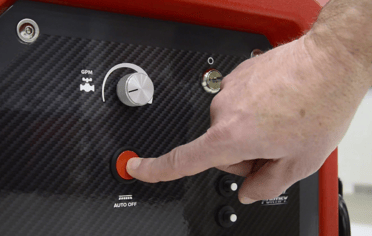
- Use Auto Off feature to remove pad drivers
- Remove pad retaining clip
- Rinse pads in approved sink and air dry
- Clean squeegee assembly
- Remove squeegee assembly by loosening black knobs
- Detach recovery hose
- Rinse assembly in approved sink and dry
- Inspect and rinse drip trap to remove debris
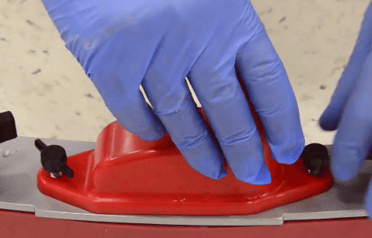
- Hang squeegee assembly from transport hook to dry

- Charge batteries
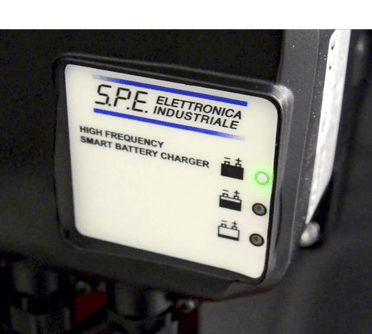
- Unwrap electrical cord and plug in to electrical outlet
- Green status light on charger indicates batteries are fully charged
---
### Operation video guide
- [Troubleshooting](https://equipment.betco.com/knowledge-base/troubleshooting?hsLang=en#main-content)
- [GeneSys Mid-Size Troubleshooting](https://equipment.betco.com/knowledge-base/troubleshooting?hsLang=en#genesys-mid-size-troubleshooting)
- [Crewman AS20B Troubleshooting](https://equipment.betco.com/knowledge-base/troubleshooting?hsLang=en#crewman-as20b-troubleshooting)
- [Optima XR Troubleshooting](https://equipment.betco.com/knowledge-base/troubleshooting?hsLang=en#optima-xr-troubleshooting)
- [Equipment Operation](https://equipment.betco.com/knowledge-base/equipment-operation?hsLang=en#main-content)
- [Crewman AS20B Operation Guide](https://equipment.betco.com/knowledge-base/equipment-operation?hsLang=en#crewman-as20b-operation-guide)
- [GeneSys Mid-Size Operation Guide](https://equipment.betco.com/knowledge-base/equipment-operation?hsLang=en#genesys-mid-size-operation-guide)
- [Optima XR Burnisher Operation Guide](https://equipment.betco.com/knowledge-base/equipment-operation?hsLang=en#optima-xr-burnisher-operation-guide)
- [Technical Bulletins](https://equipment.betco.com/knowledge-base/technical-bulletins?hsLang=en#main-content)
- [GeneSys Mid-Size](https://equipment.betco.com/knowledge-base/technical-bulletins?hsLang=en#genesys-mid-size)
- [Installation Guide](https://equipment.betco.com/knowledge-base/installation-guide?hsLang=en#main-content)
- [Optima XR Installation](https://equipment.betco.com/knowledge-base/installation-guide?hsLang=en#optima-xr-installation)
- [GeneSys Mid-Size Installation](https://equipment.betco.com/knowledge-base/installation-guide?hsLang=en#genesys-mid-size-installation)
- [Crewman AS20B Installation](https://equipment.betco.com/knowledge-base/installation-guide?hsLang=en#crewman-as20b-installation)
- [Submit & View My Tickets](https://equipment.betco.com/tickets-view)
- [Main menu](https://equipment.betco.com/knowledge-base)
[-1.png?width=325&height=55&name=Betco_logo%20rev%20(002)-1.png)](http://Betco.com)
400 Van Camp, Bowling Green, OH 43402
Copyright © 2024, Betco