-1.png?width=325&height=55&name=Betco_logo%20rev%20(002)-1.png)
Solution setting too low
-
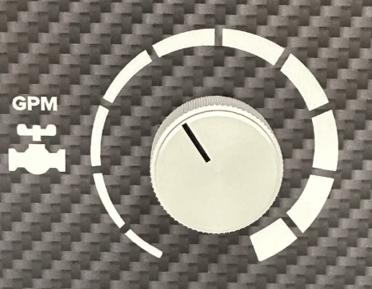
Adjust potentiometer on control panel
- Review control panel
- Inspect solution control knob
-
- Ensure knob is set to appropriate level for required work
- See operation guide for appropriate solution levels
- Ensure knob is set to appropriate level for required work
Solution tank is empty
-
Ensure sufficient water is available for use
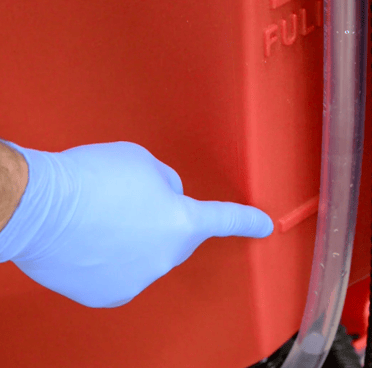
- Review site gauge located at rear left side of unit to determine water level
- Add additional water and cleaning chemical at sufficient dilution
- Review chemical labeling for appropriate dilution ratio
Solution tube is kinked or clogged
-
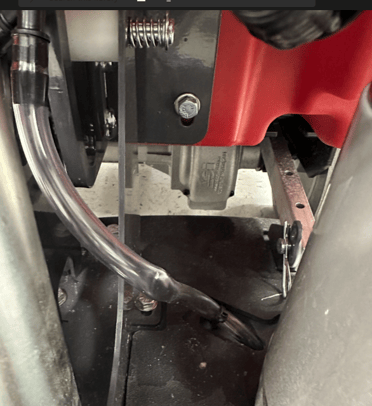
Review visible solution tubing for pressure points
- Review recovery tank to ensure it is empty
- Empty tank if necessary
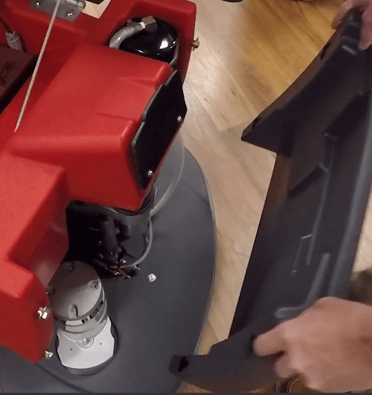
- Open battery compartment underneath recovery tank
- Remove gray access panel at front of machine
- Review recovery tank to ensure it is empty
-
- Review solution hosing for any pressure points limiting solution flow
Solution shutoff valve is closed
-
Adjust valve to open position
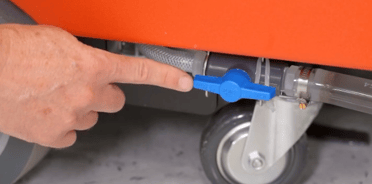
- Locate blue shutoff valve at rear left of machine, behind scrubber wheel
- Ensure valve is in open position pictured below to allow solution flow
Strainer screen is clogged
-
Remove debris from strainer
- Adjust solution shutoff valve to closed position
Note: If valve is left open, water will leak once strainer is removed
-
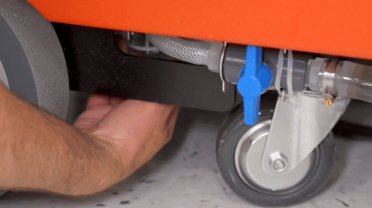
- Unscrew strainer located at rear left of machine
-
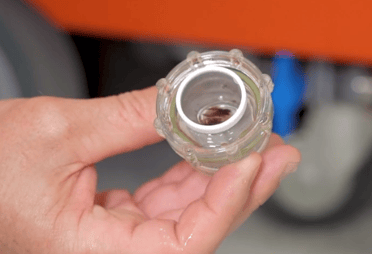
- Remove any debris obstructing screen
Troubleshooting video guide